Word Statuses
The four statuses
Every word starts as Unknown. From there, you can set it to one of four statuses:
Unknown -- you haven't learned it yet. Shows a red underline.
Seen -- you've encountered it but aren't fully confident yet. Blue underline. Use this however works for you. Some people mark a word Seen after the first lookup, others use it as "currently studying."
Known -- you recognize it without needing the popup. Green underline.
Hidden -- you want to skip it entirely. No underline and excluded from stats. Use it for words you don't need to track.
Changing statuses
Open the popup and click the status buttons at the bottom. The change takes effect immediately: the underline color updates on the page and your stats adjust right away.
Statuses track by lemma (dictionary form), not the surface form. So if you mark खाना ("to eat") as Known, all its inflected forms (खाता, खाती, खाए, खाने) count as Known too. You don't have to mark each one separately.
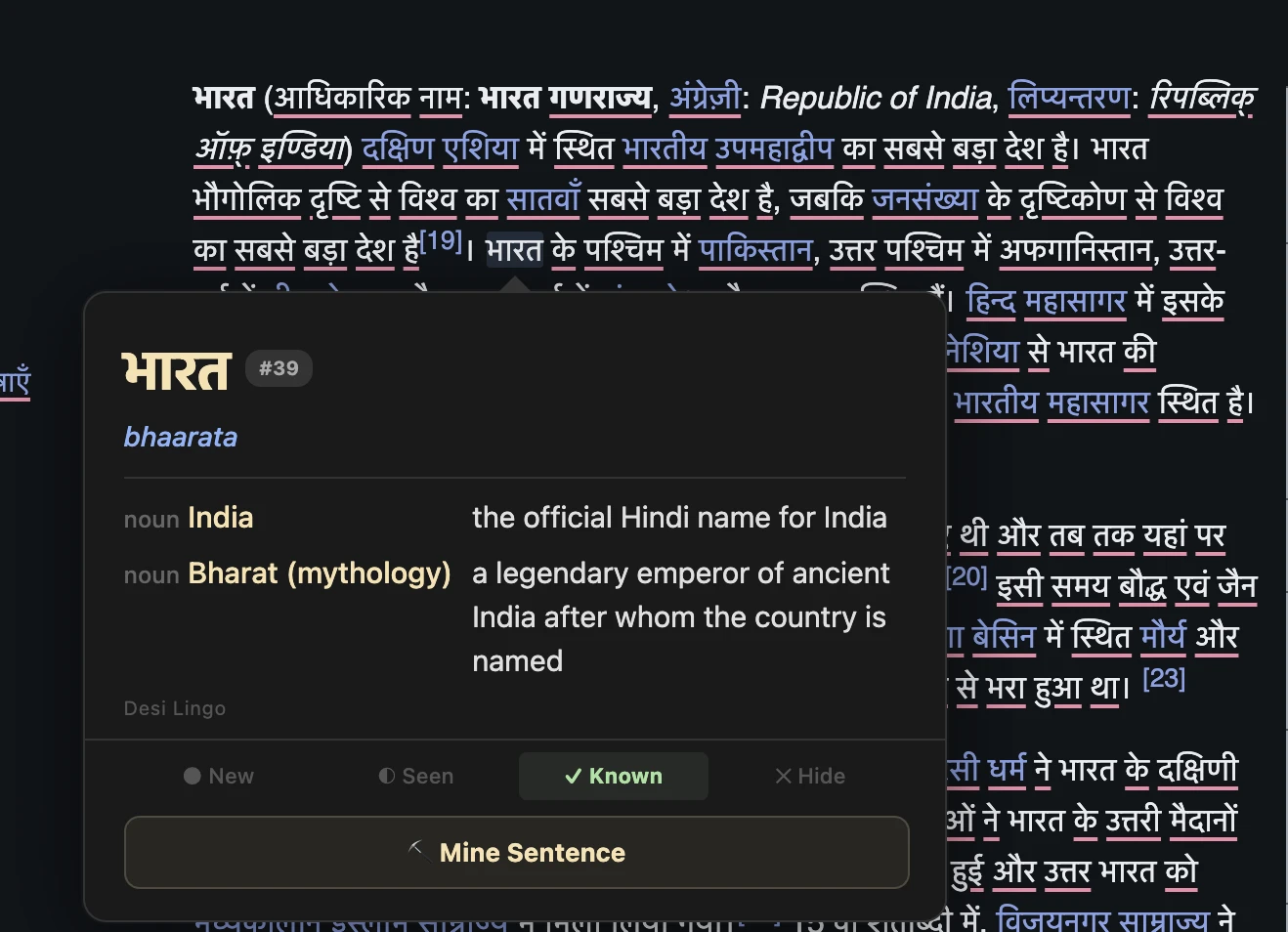
Colored underlines
After parsing a page, every Hindi word gets a colored underline: red for unknown, blue for seen, green for known. At a glance you can tell how comfortable you are with a piece of content. Mostly green means you're in good shape, mostly red means it'll be a challenge.
Same color system in video subtitles and the dictionary page.
Stats and progress
Your dashboard shows your total known and seen words, daily activity, a learning heatmap, and your streak. Click the Known or Seen count to jump to a filtered vocabulary list.
Word Statuses
The four statuses
Every word starts as Unknown. From there, you can set it to one of four statuses:
Unknown -- you haven't learned it yet. Shows a red underline.
Seen -- you've encountered it but aren't fully confident yet. Blue underline. Use this however works for you. Some people mark a word Seen after the first lookup, others use it as "currently studying."
Known -- you recognize it without needing the popup. Green underline.
Hidden -- you want to skip it entirely. No underline and excluded from stats. Use it for words you don't need to track.
Changing statuses
Open the popup and click the status buttons at the bottom. The change takes effect immediately: the underline color updates on the page and your stats adjust right away.
Statuses track by lemma (dictionary form), not the surface form. So if you mark खाना ("to eat") as Known, all its inflected forms (खाता, खाती, खाए, खाने) count as Known too. You don't have to mark each one separately.
Colored underlines
After parsing a page, every Hindi word gets a colored underline: red for unknown, blue for seen, green for known. At a glance you can tell how comfortable you are with a piece of content. Mostly green means you're in good shape, mostly red means it'll be a challenge.
Same color system in video subtitles and the dictionary page.
Stats and progress
Your dashboard shows your total known and seen words, daily activity, a learning heatmap, and your streak. Click the Known or Seen count to jump to a filtered vocabulary list.