Sentence Mining
What is sentence mining?
Instead of memorizing words from a list, you save real sentences from things you're actually reading or watching. That way you learn words in context, attached to a sentence you saw in the wild, not floating on their own.
When you find a word you want to remember, hit the Mine button in the popup. Desi Lingo saves the sentence along with the word, its definition, and the source URL.
Mining from webpages
On a parsed page, click a word, then click the pickaxe icon in the popup. The full sentence gets saved to your mining deck with the target word highlighted.
The sentence extractor is smart about text split across HTML elements, so it grabs the full sentence even if the page markup is messy. You can mine words that aren't in the dictionary too, the sentence still gets captured.
Mining from video
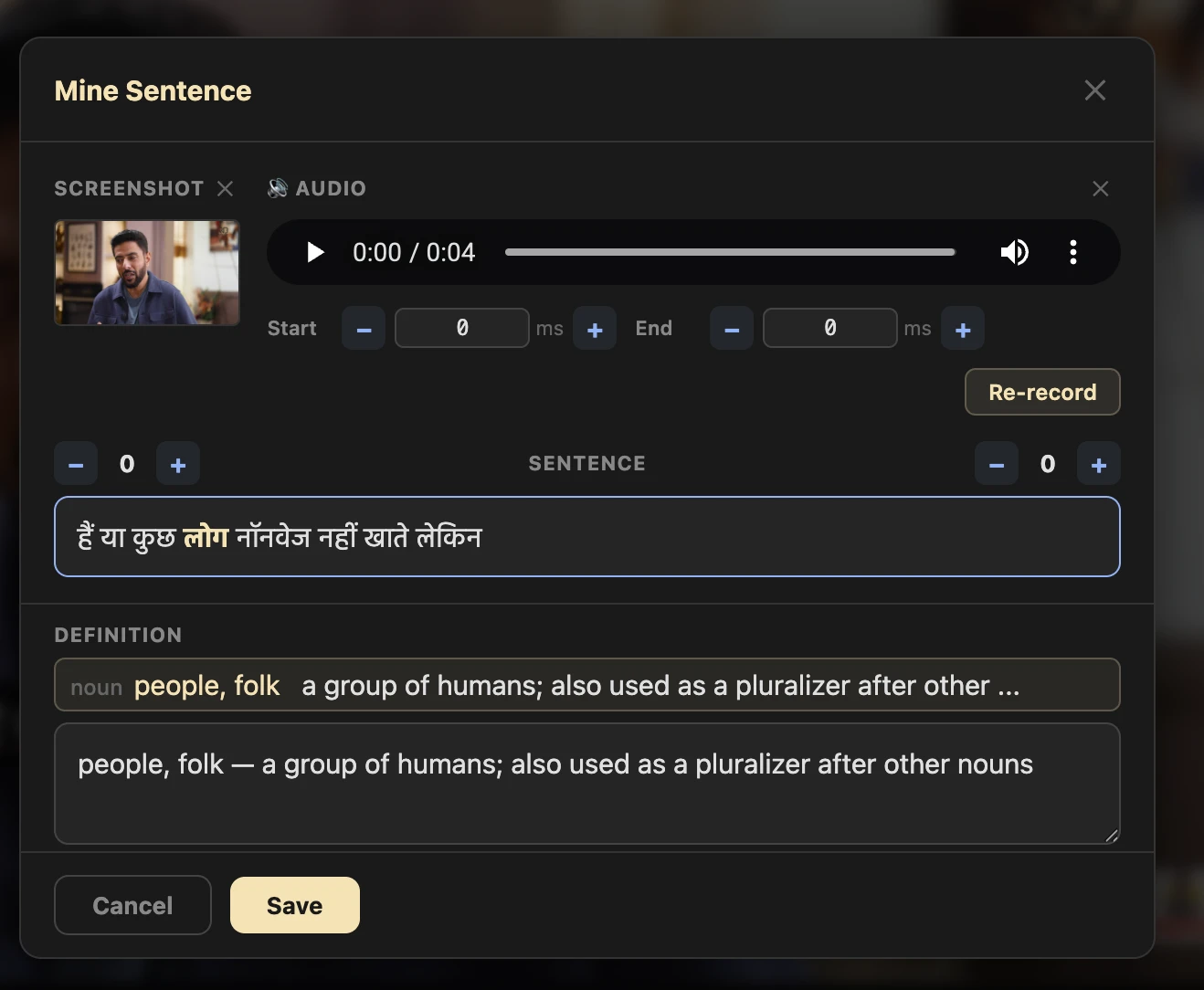
On YouTube, Netflix, or Prime Video, the mining editor goes further. It captures a screenshot of the video frame and an audio clip of the subtitle along with the text. You can fine-tune audio margins (±100ms) and re-record if the clip doesn't sound right.
The editor also shows ±10 surrounding subtitle lines so you can see the broader context.
Your mining deck
All your mined sentences live in the Mining Deck. You can get to it from the extension popup (it shows a card count badge) or from the web dashboard. Edit sentences, swap definitions, or delete cards you don't want anymore.
Exporting to Anki
There are a few ways to get your mined sentences into Anki for spaced repetition review:
AnkiConnect: if you have the AnkiConnect add-on installed in Anki, Desi Lingo can send cards directly. One click and they're in your deck.
File export: download a tab-separated .txt file and import it into Anki manually. Cards are tagged "desi_lingo" so you can filter them easily.
Desi Lingo Anki Add-on: the easiest option if you want full media support. See the Anki Integration page for setup details.
Sentence Mining
What is sentence mining?
Instead of memorizing words from a list, you save real sentences from things you're actually reading or watching. That way you learn words in context, attached to a sentence you saw in the wild, not floating on their own.
When you find a word you want to remember, hit the Mine button in the popup. Desi Lingo saves the sentence along with the word, its definition, and the source URL.
Mining from webpages
On a parsed page, click a word, then click the pickaxe icon in the popup. The full sentence gets saved to your mining deck with the target word highlighted.
The sentence extractor is smart about text split across HTML elements, so it grabs the full sentence even if the page markup is messy. You can mine words that aren't in the dictionary too, the sentence still gets captured.
Mining from video
On YouTube, Netflix, or Prime Video, the mining editor goes further. It captures a screenshot of the video frame and an audio clip of the subtitle along with the text. You can fine-tune audio margins (±100ms) and re-record if the clip doesn't sound right.
The editor also shows ±10 surrounding subtitle lines so you can see the broader context.
Your mining deck
All your mined sentences live in the Mining Deck. You can get to it from the extension popup (it shows a card count badge) or from the web dashboard. Edit sentences, swap definitions, or delete cards you don't want anymore.
Exporting to Anki
There are a few ways to get your mined sentences into Anki for spaced repetition review:
AnkiConnect: if you have the AnkiConnect add-on installed in Anki, Desi Lingo can send cards directly. One click and they're in your deck.
File export: download a tab-separated .txt file and import it into Anki manually. Cards are tagged "desi_lingo" so you can filter them easily.
Desi Lingo Anki Add-on: the easiest option if you want full media support. See the Anki Integration page for setup details.