Getting Started
Welcome!
Desi Lingo turns the Hindi content you already enjoy into a language learning tool. It works on websites, YouTube, Netflix, and Prime Video, so you learn from stuff you actually want to watch and read.
This guide covers everything, but feel free to skip to whatever you need. You don't have to read it all at once.
How it works
You browse Hindi content normally and Desi Lingo makes every word clickable. Tap a word to get its meaning and pronunciation. Over time you mark words as Known or Seen to track your progress.
There are two parts. The browser extension handles any website plus YouTube, Netflix, and Prime Video. The web dashboard has your stats, vocabulary, mining deck, and settings. They stay in sync when you're signed in.
What you need
A Chrome-based browser (Chrome, Brave, Edge, Arc, etc.) or Firefox, and a free Desi Lingo account.
You don't need to know any Hindi to start. The dictionary covers everything from the most basic words up. If you already know some Hindi, you can import your existing vocabulary from Anki decks, CSV files, or plain text lists — go to My Words > Import in the dashboard. This way Desi Lingo knows what you already know and only highlights the new stuff.
Your first session
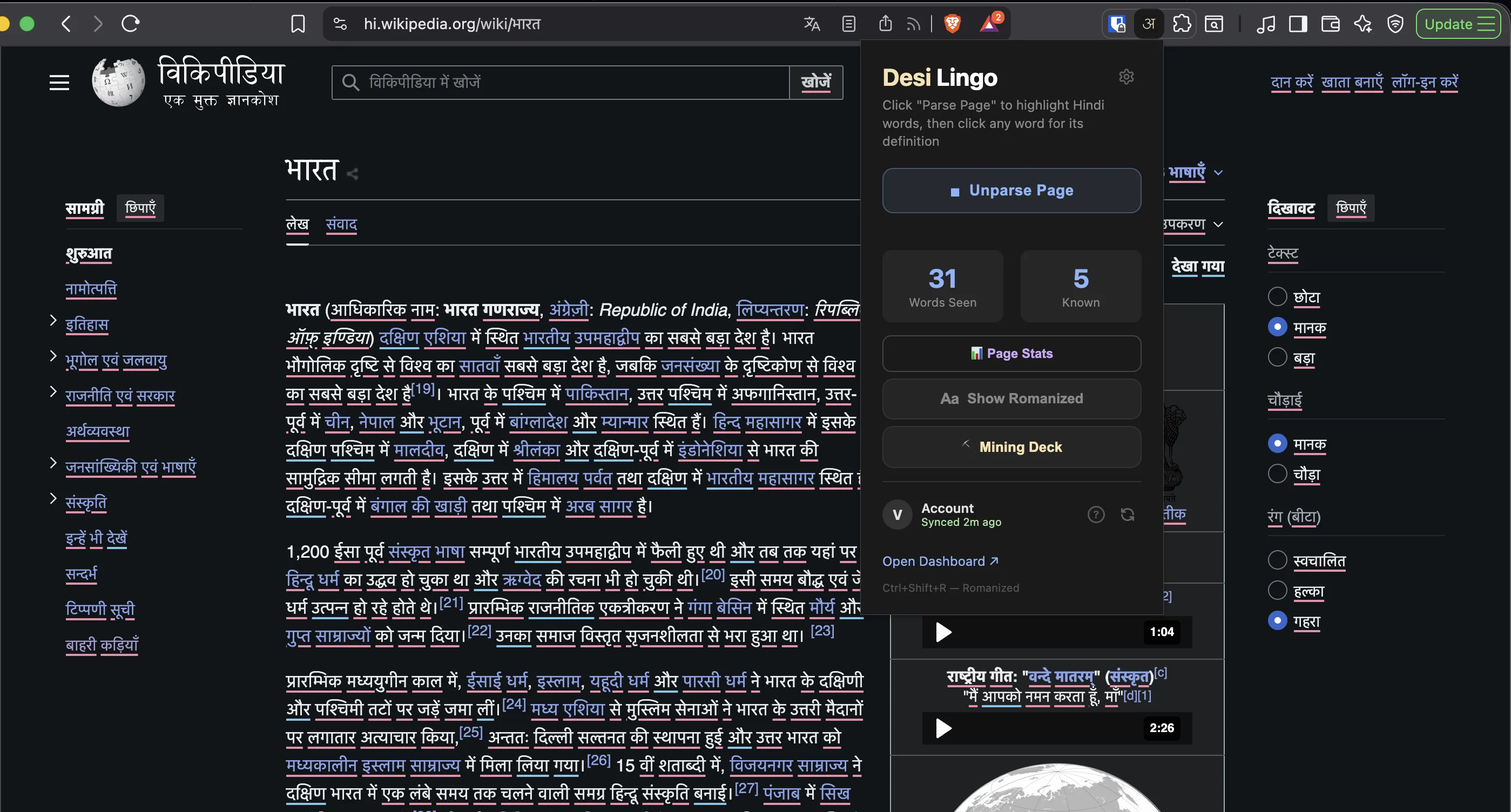
Once you've installed the extension: go to any webpage with Hindi text, click the Desi Lingo icon in your toolbar, and hit Parse. Every Hindi word on the page gets a colored underline showing whether you know it or not. Click any word to look it up.
For video, head to a Hindi-subtitled YouTube video. The extension automatically picks up the captions and shows an interactive overlay below the player. Click any word in the subtitles to look it up, same as on a webpage.
Getting Started
Welcome!
Desi Lingo turns the Hindi content you already enjoy into a language learning tool. It works on websites, YouTube, Netflix, and Prime Video, so you learn from stuff you actually want to watch and read.
This guide covers everything, but feel free to skip to whatever you need. You don't have to read it all at once.
How it works
You browse Hindi content normally and Desi Lingo makes every word clickable. Tap a word to get its meaning and pronunciation. Over time you mark words as Known or Seen to track your progress.
There are two parts. The browser extension handles any website plus YouTube, Netflix, and Prime Video. The web dashboard has your stats, vocabulary, mining deck, and settings. They stay in sync when you're signed in.
What you need
A Chrome-based browser (Chrome, Brave, Edge, Arc, etc.) or Firefox, and a free Desi Lingo account.
You don't need to know any Hindi to start. The dictionary covers everything from the most basic words up. If you already know some Hindi, you can import your existing vocabulary from Anki decks, CSV files, or plain text lists — go to My Words > Import in the dashboard. This way Desi Lingo knows what you already know and only highlights the new stuff.
Your first session
Once you've installed the extension: go to any webpage with Hindi text, click the Desi Lingo icon in your toolbar, and hit Parse. Every Hindi word on the page gets a colored underline showing whether you know it or not. Click any word to look it up.
For video, head to a Hindi-subtitled YouTube video. The extension automatically picks up the captions and shows an interactive overlay below the player. Click any word in the subtitles to look it up, same as on a webpage.